Introduction: The power of an SQL engine for your GuiXT scripts
The basis of the CallSQL command is a seamless, bidirectional link between GuiXT and an in-memory SQL engine, namely SQLite.

SQLite is the most widely deployed embedded database engine, running in web browsers, mobile phones, embedded systems, and countless other environments. Its few weak points - multi-user concurrency and distributed transaction support - are not relevant for GuiXT, so we can fully benefit from the stability, lightweight footprint, and excellent performance that have made it so successful. Its flexible, dynamically typed columns - sometimes seen as a weakness in classic database design - are actually a good fit for GuiXT's simple, string-based language.

The general approach is that you execute SQL statements using GuiXT table variables as table names - GuiXT takes care of the rest. The following practical examples show typical usage, explain the details, and hopefully serve as a blueprint for your own applications.
Count the number of rows that meet a condition
GuiXT
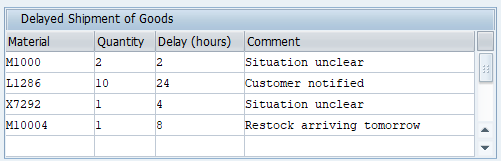
// Table variable V[shipments]
// lists materials with delayed goods shipments

if not V[shipments]
  CreateTable V[shipments] material quantity delay remark
endif

Table	(5,40)	(12,109)	_
  title="Delayed Shipment of Goods"	_
  name="shipments"	_ 
  fixedColumns=4

Column "Material" size=12 name="material"
Column "Quantity" size=8 name="quantity"
Column "Delay (hours)" size=12 name="delay"
Column "Comment"	size=34 name="remark"
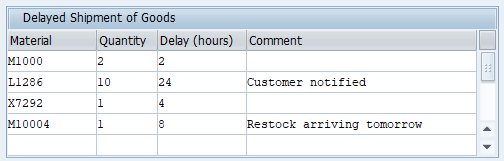


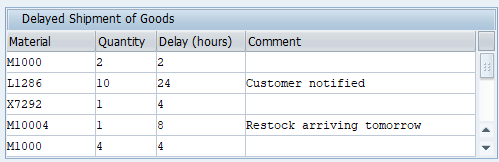
We count the rows without comment:

GuiXT
CallSQL errcount =
 "SELECT count(*) FROM V[shipments] WHERE remark = '' AND material <> '' "


The variable V[errcount] is set to 2.
We now count the rows with delay >=24. To force comparison as numbers in the condition, not as strings, we use CAST(delay as integer):

GuiXT
CallSQL delayedCount =
 "SELECT count(*) FROM V[shipments] WHERE CAST(delay AS INTEGER) >= 24 "


The variable V[delayedCount] is set to 2.
Select and copy rows


We copy the rows with delay >=24 into another table variable:

GuiXT
CreateTable V[shipments2] material quantity delay remark

CallSQL shipments2 =
 "SELECT * FROM V[shipments] WHERE CAST(delay AS INTEGER) >= 24 "


V[shipments2] now contains the row with material L1286.

Change table cells


We replace all missing comments with "Situation unclear":

GuiXT
CallSQL _
 "UPDATE V[shipments] SET remark = 'Situation unclear' WHERE remark = '' "


The GuiXT system variable V[_sqlchangecount] is set to 2.

With the RETURNING clause you can receive the changed rows:
GuiXT
CreateTable V[changes] material quantity delay remark
CallSQL changes =
 "UPDATE V[shipments] SET remark = 'Situation unclear' "   && _
   "WHERE remark = '' "  && _
     "RETURNING *"


V[changes] now contains:
M1000	2	2	Situation unclear
X7292	1	4	Situation unclear


In the UPDATE ...SET you can refer to the existing cell value and apply calculations etc. For example, we force a maximum of 96 hours as delay:
GuiXT
CallSQL 
 "UPDATE shipments SET delay = max(0, min(CAST(delay AS INTEGER), 96))"  


Automatic creation of the result table


When you use the option mode="createFromResult", GuiXT automatically creates a table variable using the SQL result columns. Example:

GuiXT
CallSQL tempshipments = _
 "SELECT material as m, quantity FROM V[shipments]" _
       mode="createFromResult"

The table variable V[tempshipments] is automatically created with following content (JSON notation):

[{"m": "M1000", "quantity": "2"}, {"m": "L1286", "quantity": "10"}, {"m": "X7292", "quantity": "1"}, {"m": "M10004", "quantity": "1"}]


Distinct values of a table columns


To get an ordered list of the distinct values in a particular column, for example the "material" column, use:

GuiXT
CallSQL materials = _
  "SELECT DISTINCT material from V[shipments] ORDER BY material" _
  mode="createFromResult"


The table variable V[materials] is automatically created with following content:
L1286
M1000
M10004
X7292


Joining tables
Joining two or more tables is often a helpful technique. Use the standard SQL syntax:

GuiXT
CreateTable V[customers] account name city country
CreateTable V[countries] country countryname

// fill the two tables, e.g. OData or database select
// ...


// join the tables
CreateTable V[customerinfo] account name city country countryname

CallSQL customerinfo = _
  "SELECT c.account, c.name, c.city, co.countryname " && _
  "FROM V[customers] as c LEFT OUTER JOIN V[countries] as co " && _
  "ON c.country = co.country" 


With table aliases (c, co), you don't have to worry about ambiguous column names when both tables share a column name, and the statements remain significantly shorter and more readable, especially when the V[...] names themselves are already long.

Adding a table index (performance)
For smaller tables, e.g. under 100 entries, SQLite operations are very fast. For very large tables, e.g. 100,000 rows, that you access frequently for reading, it is worth defining one or more  SQL indexes.

GuiXT automatically creates suitable table indexes when a table viariable of 100 entries variable or more is used unchanged a second time in CallSQL. If necessary, you can define your own indexes.

Example:
GuiXT
CreateTable V[orders] ... equnr ...
CallSQL "CREATE INDEX idx_order_equnr ON V[orders](equnr)" 
In our performance tests, we measured the following runtime figures for retrieving one row from a table with 100,000 rows: The existing SQLite table indexes can be listed with "SELECT name, sql FROM sqlite_master WHERE type = 'index' ". The execution plan for a particular SQL statement can be displayed with

CreateStructure V[plan] detail
CallSQL plan ="EXPLAIN QUERY PLAN [statement]".

Creating additional SQL tables
With CallSQL you can create SQLite tables independent of GuiXT table variables, or as a copy of a GuiXT table variable, with or without the table data. In all subsequent SQL statements you can then use this table in addition to the GuiXT table variables. Example:
GuiXT
CallSQL  "CREATE TABLE allshipments AS SELECT * FROM V[shipments]"

CallSQL materials = _
  "SELECT DISTINCT material FROM allshipments ORDER BY material" 


This creates an SQL table "allshipments" as a copy of V[shipments], including the data. The new table can be accessed by all scripts in the current session and mixed with the GuiXT V[varname] tables. If you no longer need it, use a DROP command.

Accessing file based SQLite databases
For particular GuiXT applications it can make sense to access a file-based SQLite database in addition to the GuiXT in-memory database. This is possible by executing "ATTACH DATABASE" via CallSQL, and it works seamlessly with the GuiXT variables' in-memory database.

Example:
GuiXT
CallSQL "ATTACH DATABASE 'F:/countries.sqlite3' AS geo "

CreateTable V[countries] name population gdp gdprel

CallSQL countries = _
  "SELECT name,population/1000 as population," && _
  "gdp,gdp*1000/population as gdprel " && _
  "FROM geo.countries " && _
  "WHERE population>0 AND gdprel>0 " && _
  "ORDER BY gdprel DESC"

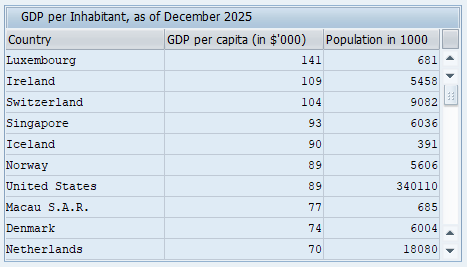
Table	(0,0)	(12,64)	name="countries"  fixedColumns=3 _ 
  title="GDP per Inhabitant, as of December 2025"		
Column "Country" -readOnly	size=22 name="name"
Column "GDP per capita (in $'000)" size=22 name="gdprel" -alignRight -readOnly
Column "Population in 1000" size=16 name="population" -alignRight -readOnly


Source: Countries States Cities Database
https://github.com/dr5hn/countries-states-cities-database | ODbL v1.0

Saving table variable into an SQLite database
The data in the in-memory database is deleted when the SAP GUI session ends. However, you can create a permanent SQLite database beforehand.

Example:
GuiXT
CreateTable V[orders] _
  SalesOrder SalesOrderType SalesOrderDate SoldToParty TotalNetAmount
CreateTable V[items] _
  SalesOrder SalesOrderItem Material RequestedQuantity RequestedQuantityUnit

// Read consignment orders via SAP OData
CallVB  guinet.odata.read _
  service:="sap/opu/odata/sap/API_SALES_ORDER_SRV/A_SalesOrder" _
  filter:="SalesOrderType eq 'CCFU' or SalesOrderType eq 'CCIS'  " _
  expand:="to_Item" _
  orderby:="SalesOrder" _
  result:="orders,items"

// Save the orders into a permanent database
// The file can be empty,
// it is automatically created as SQLite database 

CallSQL "ATTACH DATABASE 'F:\consignments.db' AS snap"
CallSQL "CREATE TABLE snap.orders AS SELECT * FROM V[orders]"
CallSQL "CREATE TABLE snap.items AS SELECT * FROM V[items]"


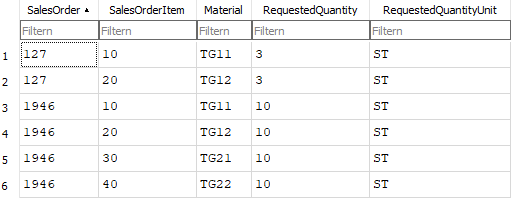
You can view the generated SQLite database using tools such as "DB Browser for SQLite"


Or you attach the generated database in a later SAP GUI session with GuiXT, as explained in the previous section:
GuiXT
CallSQL "ATTACH DATABASE 'F:\consignments.db' AS consi"

CallSQL orders = _
  "SELECT * FROM consi.orders" _
     mode="createFromResult"

CallSQL items = _
  "SELECT * FROM consi.items" _
     mode="createFromResult"


The imported GuiXT table variables retain the exact structure and content they had in the session in which they were created: