Purpose
Use the "batch" feature of the OData interface
With the "batch" feature you can combine several OData calls, such as "OData.Read", "OData.Create", "OData.Update" and "OData.Delete", into a single HTTP request to the SAP system, instead of sending each call separately. For example, you can read a maintenance order, update two of its operations and create a new component, all in one round trip. This can reduce response time considerably, especially over slower network connections or when many small requests are involved.
All requests in a batch must refer to the same OData service. Within that service, each request can address a different entity set and use its own keys, filters and other parameters.
A batch is started with "OData.CreateBatch". The subsequent OData calls are collected and not executed immediately. When the batch is sent with "OData.RequestBatch", SAP processes all collected calls in one request, and the results are then available in the GuiXT variables and table variables specified in the individual calls, exactly as if each call had been executed on its own.
With the parameter "transactional" in "OData.CreateBatch" you specify whether all changes in a batch are saved together as a single transaction ("all or nothing") or independently of each other. Details are described below.
Typical usage
// 1. Start a new batch. This call clears any previous batch results.
CallVB guinet.odata.createBatch _
  service:="..."

// 2. Queue individual OData calls; these are collected, not yet sent
CallVB guinet.odata.read _
  service:="..." _
  key:="key1" _
  result:="myresult"

CallVB guinet.odata.read _
  service:="..." _
  key:="key2" _
  result:="myresult"

CallVB guinet.odata.read _
  service:="..." _
  key:="key3" _
  result:="myresult"


// 3. Send the whole batch to the server in a single request
CallVB guinet.odata.requestBatch

// 4. Results are now available individually,
// as if each call had run standalone
CallVB guinet.odata.fetchBatchResult 1
...
CallVB guinet.odata.fetchBatchResult 2
...
CallVB guinet.odata.fetchBatchResult 3
...

// 5. Optional: explicitly free the batch results
// if no longer needed
CallVB guinet.odata.deleteBatch
Example
Our starting point is the following GuiXT app, described in Expanding data, which displays a purchase order:
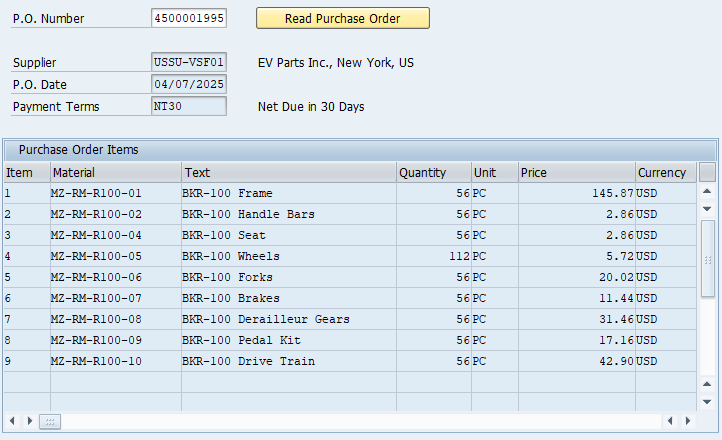
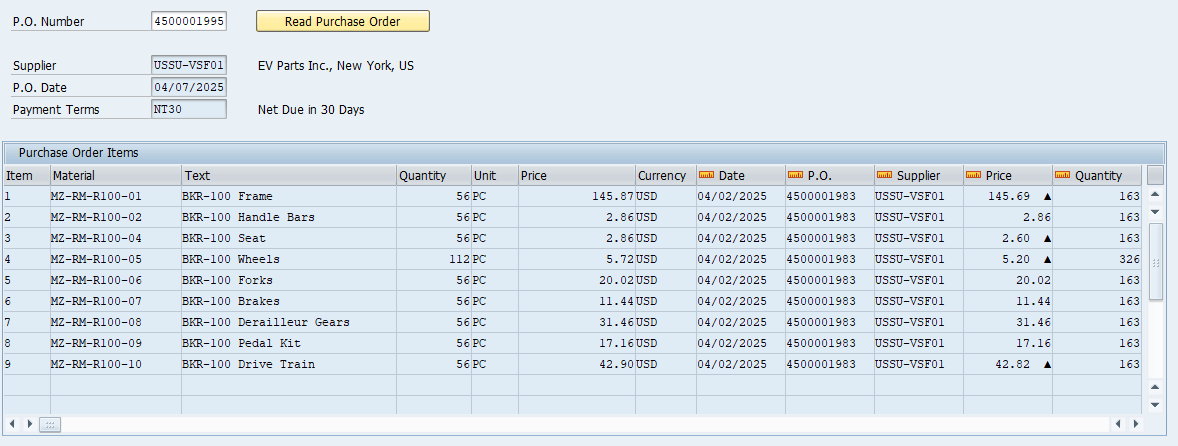
To compare purchase prices, we add columns that show the previous purchase order item for each material. The right-hand part of the table then looks like this:
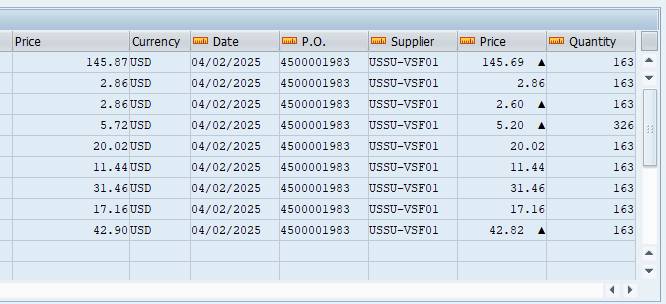
Here's what it looks like overall (please use the zoom feature on the image)
For a single material, such as MZ-RM-R100-01, we can retrieve the necessary information using the following OData call:
// read the last purchase order for the given material
CreateTable V[PurchaseOrderHeader2] _
     Supplier PurchaseOrder PurchaseOrderDate DocumentCurrency
CreateTable V[PurchaseOrderItem2] _
     PurchaseOrder PurchaseOrderItem NetPriceAmount OrderQuantity

CallVB guinet.odata.read _
    service:= _
        "sap/opu/odata4/iwbep/all/srvd_a2x/sap/api_purchaseorder_2/0001" && _
           "/PurchaseOrderItem" _
    top:="1" _
    filter:="Material eq 'MZ-RM-R100-01' " && _
    "and PurchasingDocumentDeletionCode eq '' "  && _
    "and _PurchaseOrder/PurchaseOrder ne '4500001995' "  _
    orderby:="_PurchaseOrder/PurchaseOrderDate desc" _
    expand:="_PurchaseOrder" _
    result:="PurchaseOrderItem2,PurchaseOrderHeader2"
We run this query for each purchase order item and insert the result into the new columns of the table. The complete InputScript for reading the purchase order together with all additional information is as follows:
Parameter ordernumber

CreateStructure V[PurchaseOrderHeader] _
  PurchaseOrder _
  PurchaseOrderDate _
  Supplier _
  SupplierAddressID _
  PaymentTerms

CreateStructure V[SupplierAddress] _
  SupplierAddressID _
  AddresseeFullName _
  CityName _
  Country

CreateTable V[PurchaseOrderItems] _
  PurchaseOrder _
  PurchaseOrderItem _
  Material _
  PurchaseOrderItemText _
  OrderQuantity _
  PurchaseOrderQuantityUnit _
  NetPriceAmount _
  DocumentCurrency _
  _purchaseorder2 _
  _purchaseorderdate2 _
  _supplier2 _
  _netpriceamount2 _
  _orderquantity2

// P.O. number as key
CreateStructure V[myKey] PurchaseOrder
Set V[myKey.PurchaseOrder] "&U[ordernumber]"

CallVB guinet.odata.read _
  service:="sap/opu/odata4/iwbep/all/srvd_a2x/sap/" && _
  "api_purchaseorder_2/0001/PurchaseOrder" _
  key:="myKey" _
  expand:="_PurchaseOrderItem,_SupplierAddress" _
  options:="-isDate.PurchaseOrderDate" _
  result:= _
     "PurchaseOrderHeader,PurchaseOrderItems,SupplierAddress"


Sort table=V[PurchaseOrderItems] orderBy="PurchaseOrderItem"

// read payment terms
CreateStructure V[PaymentTermsText] _
  PaymentTerms _
  PaymentTermsName

CallVB guinet.odata.read _
  service:="sap/opu/odata4/iwbep/all/cdi_cds/sap/" && _
       i_paymenttermstext/0001/Texts" _
  filter:="Language eq '&V[_language2]' and " _
     PaymentTerms eq '&V[PurchaseOrderHeader.PaymentTerms]'" _
  cache:="session" _
  result:="PaymentTermsText"

// read last purchase order from different supplier
CreateTable V[PurchaseOrderHeader2] _
   Supplier PurchaseOrder PurchaseOrderDate DocumentCurrency
CreateTable V[PurchaseOrderItem2] _
   PurchaseOrder PurchaseOrderItem NetPriceAmount OrderQuantity

Set V[k] 0

label next_item
if V[k<&V[PurchaseOrderItems.rowcount]]

  // next item number
  Set V[k] &V[k] + 1

  // read most recent purchasing item for this material
  CallVB guinet.odata.read _
    service:= _
     "sap/opu/odata4/iwbep/all/srvd_a2x/sap/api_purchaseorder_2/0001 " && _
           /PurchaseOrderItem" _
    top:="1" _
    filter:= _
      "Material eq '&V[PurchaseOrderItems.Material.&V[k]]' " && _
    "and PurchasingDocumentDeletionCode eq '' "  && _
    "and _PurchaseOrder/PurchaseOrder ne " && _
           "'&V[PurchaseOrderHeader.PurchaseOrder]' "  _
    orderby:="_PurchaseOrder/PurchaseOrderDate desc" _
    expand:="_PurchaseOrder" _
    options:="-isDate.PurchaseOrderDate" _
    result:="PurchaseOrderItem2,PurchaseOrderHeader2"

  Set V[PurchaseOrderItems._supplier2.&V[k]] _
          "&V[PurchaseOrderHeader2.Supplier.1]"
  Set V[PurchaseOrderItems._purchaseorder2.&V[k]] _
          "&V[PurchaseOrderHeader2.PurchaseOrder.1]"
  Set V[PurchaseOrderItems._purchaseorderdate2.&V[k]] _
          "&V[PurchaseOrderHeader2.PurchaseOrderDate.1]"

  // same price?
  if V[PurchaseOrderItem2.NetPriceAmount.1=" && _
           &V[PurchaseOrderItems.NetPriceAmount.&V[k]]]
    Set V[PurchaseOrderItems._netpriceamount2.&V[k]] _
          "&V[PurchaseOrderItem2.NetPriceAmount.1]"
  else
    // mark different price
    Set V[PurchaseOrderItems._netpriceamount2.&V[k]] _
         "&V[PurchaseOrderItem2.NetPriceAmount.1]  ▲"
  endif

  Set V[PurchaseOrderItems._orderquantity2.&V[k]] _
        "&V[PurchaseOrderItem2.OrderQuantity.1]"

  goto next_item
endif

Return
The additional columns ("_purchaseorder2", "_purchaseorderdate2", ...) are not read from the OData service, because their names start with an underscore and contain only lowercase letters. Both conditions must be met; a column such as "_PurchaseOrder2" would be included in the OData request. You can fill these columns yourself later for display purposes.
Using the OData Trace in the GuiXT window
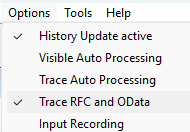
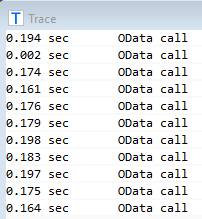
The response times of the 9 additional OData requests total 1.6 seconds. This is still acceptable, but with more purchase order items or in other applications, response times can quickly become too long.
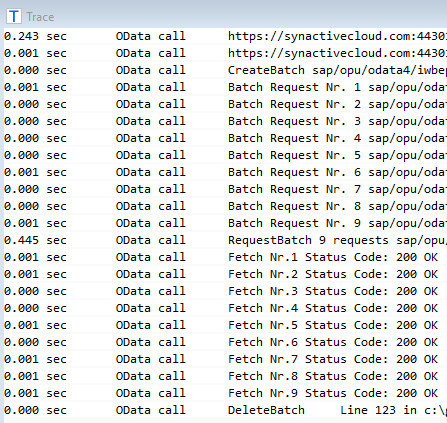
A significant part of the request time is caused not by database accesses in the SAP application, but by the network round trip and the general overhead of OData processing. With batch processing, most of this overhead is incurred only once for all 9 requests together.
After switching the OData access to a batch (see the InputScript below), the GuiXT OData Trace shows the following request times:
Parameter ordernumber

CreateStructure V[PurchaseOrderHeader] _
  PurchaseOrder _
  PurchaseOrderDate _
  Supplier _
  SupplierAddressID _
  PaymentTerms

CreateStructure V[SupplierAddress] _
  SupplierAddressID _
  AddresseeFullName _
  CityName _
  Country

CreateTable V[PurchaseOrderItems] _
  PurchaseOrder _
  PurchaseOrderItem _
  Material _
  PurchaseOrderItemText _
  OrderQuantity _
  PurchaseOrderQuantityUnit _
  NetPriceAmount _
  DocumentCurrency _
  _purchaseorder2 _
  _purchaseorderdate2 _
  _supplier2 _
  _netpriceamount2 _
  _orderquantity2

// P.O. number as key
CreateStructure V[myKey] PurchaseOrder
Set V[myKey.PurchaseOrder] "&U[ordernumber]"

CallVB guinet.odata.read _
  service:="sap/opu/odata4/iwbep/all/srvd_a2x/sap/" && _
  "api_purchaseorder_2/0001/PurchaseOrder" _
  key:="myKey" _
  expand:="_PurchaseOrderItem,_SupplierAddress" _
  options:="-isDate.PurchaseOrderDate" _
  result:= _
     "PurchaseOrderHeader,PurchaseOrderItems,SupplierAddress"


Sort table=V[PurchaseOrderItems] orderBy="PurchaseOrderItem"

// read payment terms
CreateStructure V[PaymentTermsText] _
  PaymentTerms _
  PaymentTermsName

CallVB guinet.odata.read _
  service:="sap/opu/odata4/iwbep/all/cdi_cds/sap/" && _
       i_paymenttermstext/0001/Texts" _
  filter:="Language eq '&V[_language2]' and " _
     PaymentTerms eq '&V[PurchaseOrderHeader.PaymentTerms]'" _
  cache:="session" _
  result:="PaymentTermsText"

// read last purchase order from different supplier
CreateTable V[PurchaseOrderHeader2] _
   Supplier PurchaseOrder PurchaseOrderDate DocumentCurrency
CreateTable V[PurchaseOrderItem2] _
   PurchaseOrder PurchaseOrderItem NetPriceAmount OrderQuantity

Set V[k] 0

label next_item
if V[k<&V[PurchaseOrderItems.rowcount]]

  // next item number
  Set V[k] &V[k] + 1

  // read most recent purchasing item for this material
  CallVB guinet.odata.read _
    service:= _
     "sap/opu/odata4/iwbep/all/srvd_a2x/sap/api_purchaseorder_2/0001" && _
       "/PurchaseOrderItem" _
    top:="1" _
    filter:="Material eq '&V[PurchaseOrderItems.Material.&V[k]]' " && _
    "and PurchasingDocumentDeletionCode eq '' "  && _
    "and _PurchaseOrder/PurchaseOrder ne " && _
              '&V[PurchaseOrderHeader.PurchaseOrder]' "  _
    orderby:="_PurchaseOrder/PurchaseOrderDate desc" _
    expand:="_PurchaseOrder" _
    options:="-isDate.PurchaseOrderDate" _
    result:="PurchaseOrderItem2,PurchaseOrderHeader2"

  goto next_item
endif

// Send the whole batch to the server in a single request
CreateTable V[statustable] index httpstatus
CallVB guinet.odata.requestBatch returnstatus:="statustable"

// Fetch results
Set V[k] 0

label fetch_next_item
if V[k<&V[PurchaseOrderItems.rowcount]]

  // next item number
  Set V[k] &V[k] + 1

  CallVB guinet.odata.fetchBatchResult &V[k]

  Set V[PurchaseOrderItems._supplier2.&V[k]] _
         "&V[PurchaseOrderHeader2.Supplier.1]"
  Set V[PurchaseOrderItems._purchaseorder2.&V[k]] _
         "&V[PurchaseOrderHeader2.PurchaseOrder.1]"
  Set V[PurchaseOrderItems._purchaseorderdate2.&V[k]] _
         "&V[PurchaseOrderHeader2.PurchaseOrderDate.1]"

  // same price?
  if V[PurchaseOrderItem2.NetPriceAmount.1=" && _
        "&V[PurchaseOrderItems.NetPriceAmount.&V[k]]]
    Set V[PurchaseOrderItems._netpriceamount2.&V[k]] _
          "&V[PurchaseOrderItem2.NetPriceAmount.1]"
  else
    // mark different price
    Set V[PurchaseOrderItems._netpriceamount2.&V[k]] _
          "&V[PurchaseOrderItem2.NetPriceAmount.1]  ▲"
  endif

  Set V[PurchaseOrderItems._orderquantity2.&V[k]] _
          "&V[PurchaseOrderItem2.OrderQuantity.1]"

  goto fetch_next_item
endif

// free btach results
CallVB guinet.odata.deleteBatch

Return
Request status table
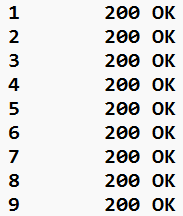
The "OData.RequestBatch" call can optionally return a status table containing the HTTP status code of each individual request in the batch. Note that "OData.RequestBatch" itself returns status code 200 (OK) or 202 (Accepted) even if individual requests in the batch have failed. You should therefore check the status table to find out whether all requests were successful.
For our example above, the status table looks like this:
Transactional batch processing
In an OData batch, modifying requests ("OData.Create", "OData.Update", "OData.Delete") are grouped into so-called changesets. SAP processes each changeset as a single transaction: either all changes in the changeset are saved, or, if one of them fails, none of them are. Different changesets within the same batch are independent of each other. Read requests ("OData.Read") are never part of a changeset.
The GuiXT OData interface supports two modes, selected with the parameter "transactional" in "OData.CreateBatch":
transactional:="X"(default): All modifying requests in the batch form a single changeset. The changes are saved together as one transaction, or not at all.transactional:="N": Each modifying request forms its own changeset. Each change is saved independently, so a failed request does not affect the others.
Batches with several changesets that each contain more than one modifying request are currently not supported. If you need this, split the changes into several batches, one per transaction.
Please note that not every SAP service can process changes to several business objects in one transaction. For example, the purchase order API allows only one purchase order per changeset, while the sales order API (OData V4) supports several sales orders in one changeset. Before using transactional:="X" for changes to several business objects, check the documentation of the respective SAP API. Otherwise, use transactional:="N".
With transactional:="N", do not change the same business object in several requests of one batch. SAP saves each changeset asynchronously, so the object may still be locked by the previous change when the next request is processed. This results in sporadic lock errors such as "User ... already processing Purchase order ...". Use transactional:="X" for several changes to the same business object.
If a request in a transactional batch fails, SAP stops processing the changeset and discards all changes in it.
The following InputScript changes the texts of two items of a purchase order:
Object changes in batch mode
CreateStructure V[PurchaseOrderItem] _
  PurchaseOrderItemText

CallVB guinet.odata.CreateBatch _
  service:="sap/opu/odata4/iwbep/all/srvd_a2x/sap/" && _
  "api_purchaseorder_2/0001"

// P.O. number and item number as key
CreateStructure V[myKey] PurchaseOrder PurchaseOrderItem

// Message structure for SAP messages
CreateStructure V[msg] type message

// change text of item 1
Set V[myKey.PurchaseOrder] "4500001995"
Set V[myKey.PurchaseOrderItem] "1"
Set V[PurchaseOrderItem.PurchaseOrderItemText] "BKR-100 Carbon Frame"

CallVB guinet.odata.update _
  service:="sap/opu/odata4/iwbep/all/srvd_a2x/sap/" && _
  "api_purchaseorder_2/0001/PurchaseOrderItem" _
  key:="myKey" _
  values:="PurchaseOrderItem"

// change text of item 2
Set V[myKey.PurchaseOrder] "4500001995"
Set V[myKey.PurchaseOrderItem] "2"
Set V[PurchaseOrderItem.PurchaseOrderItemText] "BKR-100 Red Handle Bars"

CallVB guinet.odata.update _
  service:="sap/opu/odata4/iwbep/all/srvd_a2x/sap/" && _
  "api_purchaseorder_2/0001/PurchaseOrderItem" _
  key:="myKey" _
  values:="PurchaseOrderItem"

// Send the updates to the server in a single request
CreateTable V[statustable] index httpstatus
CallVB guinet.odata.requestBatch _
  message:="msg"

// any error ?
if V[msg.type=E]
  // SAP error message from batch request
  Message "&V[msg.message]" type="&V[msg.type]" _
    title="P.O. Update Error"
endif

// delete batch
CallVB guinet.odata.deleteBatch

Return
Components InputAssistant + GuiXT Controls