Purpose
Optimize the performance of OData calls
SAP OData services are often individually programmed, so performance tips cannot be quite as universal as, for example, tips for optimized access to SQL databases. In most cases, however, it pays to consider the following aspects.
1. Measure the runtime of your calls
Use the trace function available in the GuiXT window. Here is an example from the tip on batch OData calls:
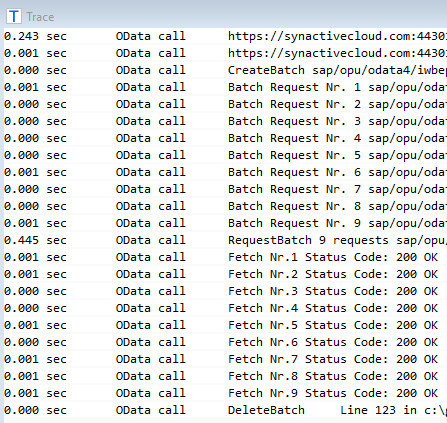
If a single call turns out to be slow, you can analyse it further on the SAP side with the SAP Gateway performance trace (transaction /IWFND/TRACES). It shows how the time is split between the OData framework and the application logic of the service.
2. Measure with different data volumes
The total runtime consists of
- building the request in GuiXT (client side),
- the network round trip (possibly several internal requests for large data volumes),
- the SAP OData framework,
- the actual processing in the SAP application.
For small data volumes in particular, the network and the SAP OData framework dominate the runtime. Reading 100 records therefore takes hardly longer than reading a single one.
3. Reduce the number of calls
Proven techniques:
-
Request all required records in a single call by using a suitable filter condition.
If the filter condition can become very long (many keys combined with OR), the maximum URL length may be exceeded. In this case, place the request in a batch in your script, even if the batch contains only this one call: the filter condition then moves from the URL, which is limited in length, into the request payload, which is not. - Use the expand function to read dependent data in the same call.
- Send several calls to the same service together in one batch.
4. Use the cache functions of the GuiXT OData interface
For master data such as customer addresses, you can usually assume that the data does not change within an SAP GUI session, or that a change is not immediately relevant to the user. Use the session cache for such data.
5. Read only the columns you really need
The GuiXT OData interface automatically requests only those columns that are named in your structure and table variables. So remove all columns you do not need. This reduces the time for reading the data and for transporting it through the various layers.
6. Work in two steps in the user interface
First display only overview data, for example a list with order header data. Read and display the order details only when the user selects a particular order.
7. Limit the number of records when the user enters selection criteria
Do not choose the default maximum number of records too small: as explained in section 2, the runtime does not grow proportionally with the number of records read. On the other hand, there is little point in offering the user a list of 10,000 rows. Let the user increase the maximum if needed, ideally via a dropdown with values such as 100 (default), 400, 1000 and 5000, and preferably the same in all your applications.
GuiXT OData deliberately does without the client-side paging and dynamic reloading during scrolling that is common in Fiori. The user therefore always sees the actual number of available rows on the scrollbar and experiences no delays when scrolling.
8. Check how the service handles filters
Not every OData service passes filter conditions on to the database. With some service implementations,
all records are read first and the filter is applied afterwards. A filter that seems selective can then
still be slow. Compare the runtime of a filtered call with that of an unfiltered one: if they are about the
same, prefer filtering on fields that the service handles efficiently, typically key fields, or ask the
service developer.
Components InputAssistant + GuiXT Controls