Purpose
Using SAP Configuration Data via a Local SQLite Database
Many GuiXT applications need data from SAP customizing tables, for example to:
- display the name for a country key,
- offer a dropdown list for entering a division,
- determine the company code that belongs to a plant.
Traditionally, this data is read at runtime, either via RFC using the function module /guixt/dbselect, or via an OData call to the corresponding service.
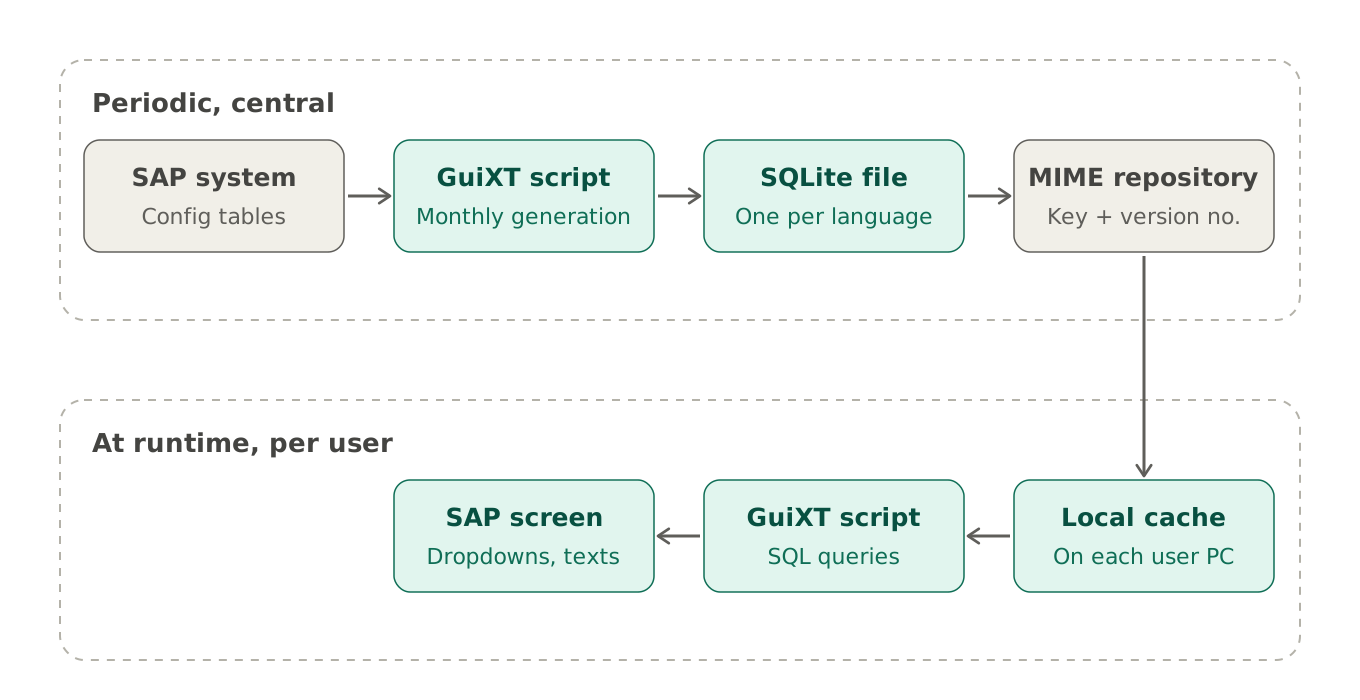
This section describes an alternative that requires no RFC or OData calls to the SAP system at runtime. It works as follows:
- Generate. At regular intervals, for example monthly, a GuiXT script (see below) creates an SQLite database that replicates all required configuration tables. Even with several hundred tables, such as countries, currencies, plants, divisions and units of measure, the resulting file is typically only a few MB in size.
- Publish. You upload the file to the SAP MIME Repository under a fixed key, replacing the previous version, and increase the version number (GuiXT statement
VersionNumber). - Use. Your scripts read the data from the SQLite database to build dropdown lists, validate input, add descriptive texts, and so on. Since GuiXT keeps MIME Repository files in a local cache, each user’s PC normally downloads the database only once per cycle, after you have regenerated it and increased the version number.
The procedure is illustrated in the following diagram:
Limitations compared to runtime access via RFC/ODatad
- Data currency. The data is fully up to date only immediately after regeneration. This limits which tables are suitable for replication. For most candidate tables, however, changes are rare and not critical for the GuiXT application. If needed, the database can be regenerated outside the regular cycle.
- Visibility on user PCs. The data resides in the local cache on users’ PCs, so data protection rules out some tables. Many tables remain suitable, though, such as country codes, units of measure or plant names. They contain generally available information and are not subject to read authorization checks.
- System and client dependency. Customizing can differ between systems (development, quality, production) and between clients. If this matters for your application, generate one database per system or client and store each under its own key.
- Languages. Text tables are language-dependent. Since a user normally works in a single logon language, generate a separate database for each language and store each one under its own key. Only the database matching the user’s logon language is then transferred to their PC, which keeps the file small.
Advantages
- Fast and simple access. Reading from a local SQLite database takes a fraction of a millisecond, with no network roundtrip. Values from several tables can be combined in a single SQL query, for example plant → valuation area → company code.
- Reduced load on the SAP system. The tables are read once during generation instead of once per user and session. Access to the MIME Repository is needed only periodically, since the database is kept in the local cache afterwards.
- Central control. Because the database is generated centrally, you decide exactly which tables and fields are made available to users.
- No RFC authorization at runtime. Users do not need RFC authorization for table access, since the data is read locally.
An Example
We demonstrate the procedure with a small example. The GuiXT script sqlitegeneration.txt generates the tables. Which tables it generates is controlled by a text file, sqliteconfig.ini, which looks like this for our example:
D;WAERS;CURRENCY
D;MEINS;UNIT_OF_MEASURE
D;BUKRS;COMPANY_CODE
D;VKORG;SALES_ORGANIZATION
D;VTWEG;DISTRIBUTION_CHANNEL
D;SPART;DIVISION
D;MTART;MATERIAL_TYPE
D;KOKRS;CONTROLLING_AREA
O;sap/opu/odata/sap/API_COUNTRY_SRV;COUNTRY;
          A_CountryText;Country,CountryName;Language eq 'EN'
O;sap/opu/odata/sap/API_PLANT_SRV;PLANT;
          A_Plant;Plant,PlantName,CompanyCode,CompanyCodeName
A detailed description of all entries follows further below. As a first orientation:
- Entries starting with
Dgenerate a table based on an SAP DDIC domain, given in the second column (WAERS,MEINS, etc.). The third column specifies the name of the table in the SQLite database (CURRENCY,UNIT_OF_MEASURE, etc.). - Entries starting with
Oread the data from an OData service instead of a DDIC domain. The fields are:- the service path (e.g.
sap/opu/odata/sap/API_COUNTRY_SRV) - the name of the SQLite table (
COUNTRY) - the OData entity set (
A_CountryText) - optionally, the columns to extract (
Country,CountryName); if omitted, all columns are extracted - optionally, a filter condition, here English as the language (
Language eq 'EN').
- the service path (e.g.
Note on languages: All domain-based entries (
D), as well as many OData services, automatically use the logon language to select the texts.API_COUNTRY_SRVreturns the texts in all languages, so a separate filter condition on the language is required.
The second OData entry also shows how data from different SAP tables can be combined: for each plant, the table PLANT contains the associated company code and its name.
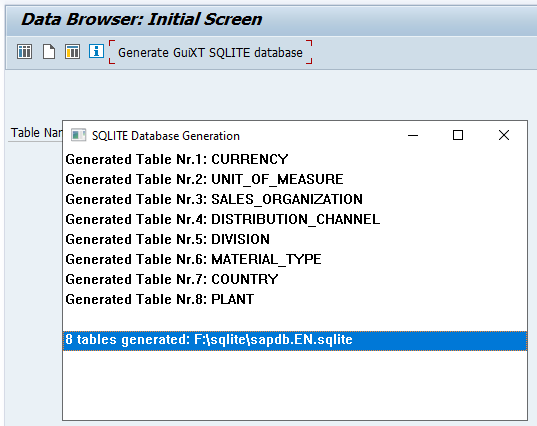
The generation takes only 2–3 seconds:
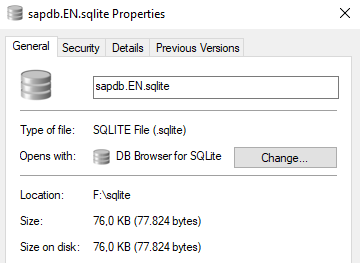
The size of the generated SQLite database file is 76 KB:
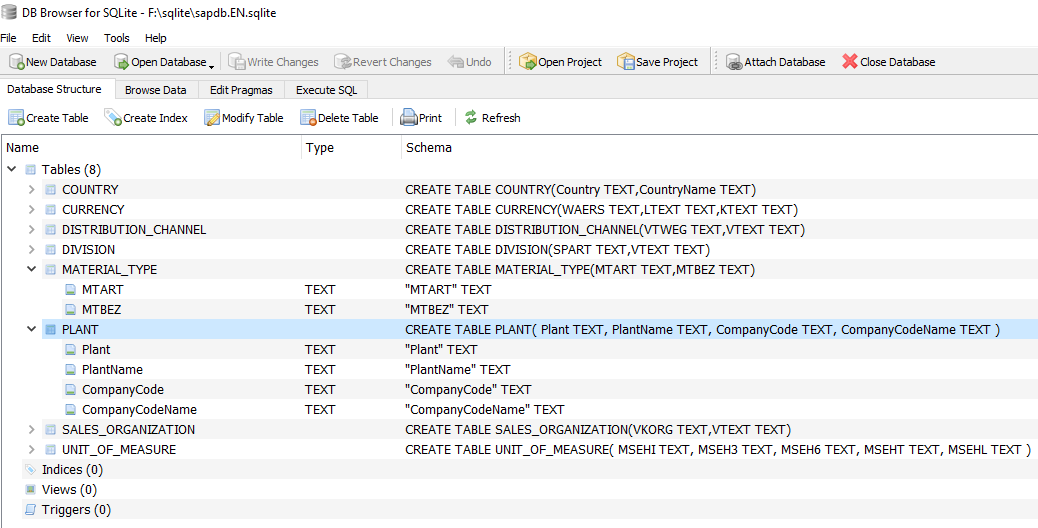
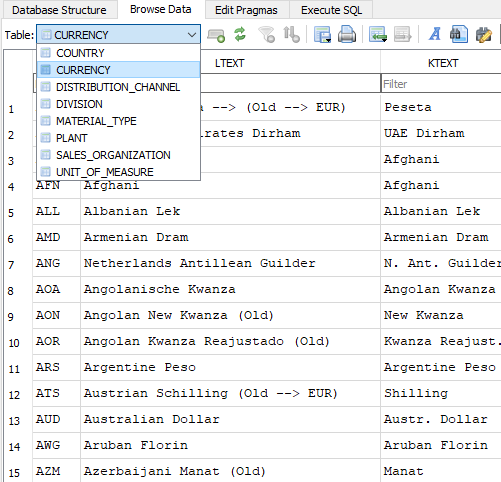
We can now inspect the generated SQLite database, for example with the free tool DB Browser for SQLite. The DB Browser shows the table names, column names and the table content, a good basis for using the tables in GuiXT scripts:
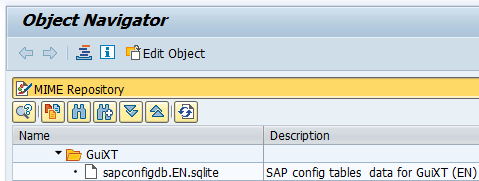
Next, we upload the file sapdb.EN.sqlite to the SAP MIME Repository:
In the session script, we attach this file as database "sapconfig":
VersionNumber "2026-10-12"

// attach SAP config DB
CacheFile _
   "SAPMR:SAP\Public\GuiXT\sapconfigdb.&V[_language2].sqlite" _
      localFileName="mysapconfigdb"

CallSQL "ATTACH DATABASE '&V[mysapconfigdb]' AS sapconfig"
We now have the basis to work with the replicated configuration tables in each script. For example, we can easily create a dropdown list for "Currency":
// read currencies from sapconfig
if not V[all_currencies]
  CallSQL V[all_currencies] = _
    "SELECT waers,ltext FROM sapconfig.CURRENCY" _
       mode="createFromResult"
endif

// create dropdown for currency selection
Text	(6,90) "Currency" size=10 -label
DropDownList (6,100)	table="V[all_currencies]" 	_
  width=30	refer="V[currency]" -showKeys
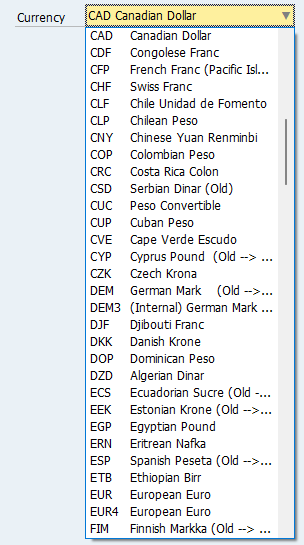
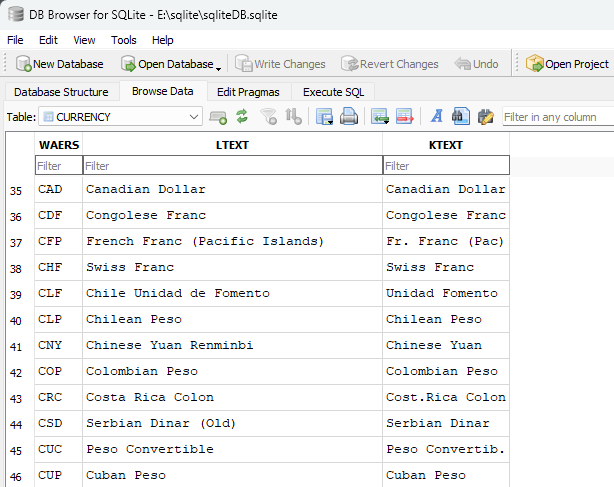
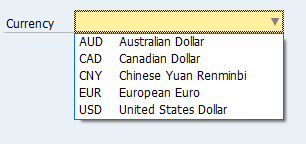
The currencies in the dropdown list are taken directly from the local SQLite table “CURRENCY”:
Another option is to restrict the currency list to the currencies actually in use during generation. You can do this with the following entry in the control table:
D;WAERS;CURRENCY;;;WAERS in ('AUD','CAD','CNY','EUR','USD') AND SPRAS = 'E'
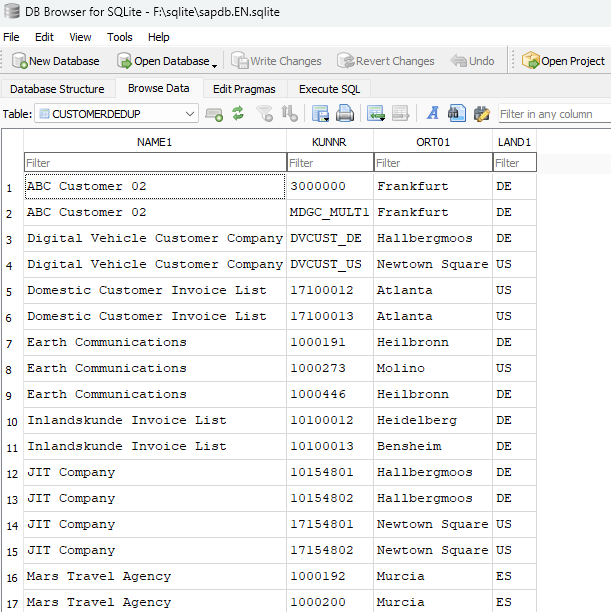
You can also include additional SAP tables in the SQLite replication, for example your own Z tables. By specifying filter conditions, you can select subsets of the data and, going beyond pure replication, generate in advance exactly the records a particular application needs. As an example, we select all customers sharing the same name into the SQL table CUSTOMERDEDUP. All it takes is the following line in the control table:
T;KNA1;CUSTOMERDEDUP;;NAME1,KUNNR,ORT01,LAND1;name1 IN ( SELECT name1 FROM kna1 GROUP BY name1 HAVING COUNT(*) > 1 )
The result:
Control File sqliteControl.ini
The control file sqliteControl.ini defines which SQLite tables are generated.
It is a plain text file. Each line describes one generation entry and consists of up to
six fields separated by semicolons:
D;WAERS;CURRENCY
O;sap/opu/odata/sap/API_COUNTRY_SRV;COUNTRY;
          A_CountryText;Country,CountryName;Language eq 'EN'
The first field specifies the type of generation:
| Type | Source | Data is read via |
|---|---|---|
D |
SAP domain (value table of the domain) | RFC |
O |
OData service | HTTPS |
T |
SAP table | RFC |
Overview
The meaning of fields 2 to 6 depends on the type:
| Field | D – Domain | O – OData service | T – Table |
|---|---|---|---|
| 2 | Domain name required | Service path required | SAP table name required |
| 3 | SQLite table name required | SQLite table name required | SQLite table name required |
| 4 | not used, leave empty | Entity name required | not used, leave empty |
| 5 | Column list optional | Property list optional | Column list required |
| 6 | Filter, ABAP SQL syntax optional | Filter, OData v4 syntax optional | Filter, ABAP SQL syntax optional |
SQLite table names
SQLite table names are not case-sensitive. Please observe the following rules:
- Allowed characters: letters
A-Z,a-z, digits0-9and the underscore_. - The name must not start with a digit.
- No spaces or special characters such as
-.!@#$. - No SQL keywords: reserved words such as
TABLE,SELECT,CREATEorINDEXcannot be used as a name on their own.
Type D – Domain
Generates an SQLite table from the value table of an SAP domain.
| Field | Content | |
|---|---|---|
| 2 | Name of the SAP DDIC domain in uppercase, e.g. WAERS or MTART.
If no value table is assigned to the domain in the SAP system, nothing is generated.
Use * to generate all domains (see below). |
required |
| 3 | Name of the generated SQLite table, e.g. CURRENCY. |
required |
| 4 | Currently not used, should be empty. | |
| 5 | Comma-separated list of the columns to be extracted from the SAP value table. | optional |
| 6 | Filter condition for selecting the generated entries, in ABAP SELECT syntax, e.g.WAERS in ('AUD','CAD','CNY','EUR','USD') AND SPRAS = 'E'If you specify a filter, you need to include the language key yourself. |
optional |
Generating all domains
If you specify * as the domain name, all SAP domains for which a value table
is defined in the SAP Data Dictionary are generated. The SQLite table names are formed
automatically from the domain name with the prefix DOM_, e.g. DOM_WAERS.
No further fields are required:
D;*In our test on an SAP S/4HANA 2023 FPS3 fully-activated appliance, generating all domains took about 30 minutes. 6,456 value tables were generated, and the resulting SQLite database had a size of 405 MB (English texts).
Generating all domains is not recommended for productive use. It can be helpful, however, when selecting the relevant domains: you can browse the contents locally with DB Browser for SQLite to decide which domains you need, and possibly which subset of values (e.g. countries, currencies).
Generation prerequisites
- An RFC connection to the SAP system.
- The function module
guixt/dbselectis installed. - The user performing the generation has the RFC authorizations described for
guixt/dbselect, as well as authorization to read the respective SAP tables.
Type O – OData service
Generates an SQLite table from an entity set of an OData service.
| Field | Content | |
|---|---|---|
| 2 | Path of the OData service, e.g. sap/opu/odata/sap/API_PLANT_SRV. |
required |
| 3 | Name of the generated SQLite table, e.g. PLANT. |
required |
| 4 | Name of the OData entity, e.g. A_Plant. |
required |
| 5 | Comma-separated list of the properties to be read, e.g.Plant,PlantName,CompanyCode,CompanyCodeNameSpecify the names exactly as defined in the OData service, including upper/lower case. |
optional |
| 6 | Filter condition for the generated entries, e.g. Language eq 'EN'
if the service does not automatically return only entries in the logon language.
The filter syntax is described in the GuiXT OData interface documentation (OData v4 format). |
optional |
Example
O;sap/opu/odata/sap/API_COUNTRY_SRV;COUNTRY;
                          A_CountryText;Country,CountryName;Language eq 'EN'
Generation prerequisites
- The SAP HTTPS server and port are specified in the GuiXT profile.
- The user performing the generation has the authorizations checked by the OData service.
Type T – Table
Generates an SQLite table from the contents of an SAP table.
| Field | Content | |
|---|---|---|
| 2 | Name of the SAP table in uppercase, e.g. T179T (product hierarchy texts). |
required |
| 3 | Name of the generated SQLite table, e.g. PRODHTEXT. |
required |
| 4 | Currently not used, should be empty. | |
| 5 | Comma-separated list of the columns to be extracted from the SAP table. | required |
| 6 | Filter condition for selecting the generated entries, in ABAP SELECT syntax.
If you specify a filter, you need to include the language key yourself. |
optional |
Example
T;T179T;PRODHTEXT;;PRODH,VTEXT;SPRAS = 'E'Generation prerequisites
- An RFC connection to the SAP system.
- The function module
guixt/dbselectis installed. - The user performing the generation has the RFC authorizations described for
guixt/dbselect, as well as authorization to read the respective SAP tables.
Scripts (GuiXT Controls 2026 Q4 1 and upwards required for the OData generation
Copy the two scripts into your script folder, adjust the location of the control file and of the SQLite database, adjust the control file and start the generation via a pushbutton, e.g.
PushButton (toolbar) "Start SQLite generation" process="sqliteGeneration.txt"