We extend the example from tutorial 11 (service orders) to include the confirmations. To do this, we use a number of typical S10 techniques:
- Derived values in the table display
- Dynamic CSS classes
- Dynamic images
- Data change
- Update table display after data changes
You can start the finished application via the link
https://synactivecloud.com/sap/bc/bsp/s10/pmconfirmation/default.htm
For trying out we recommend the order with the number 4006536 "Maintenance at 50.000 miles", because it contains many operations.
All files and the source code of the ABAP programs can be downloaded here: pmconfirmation.zip
The tutorial does not contain any fundamentally new techniques, but it shows by way of example how an application (in this case the service list from Tutorial 11) can be extended step by step to include further elements.
Our starting point is the basic "Service orders" list from Tutorial 11. First, we define the short display of the operations as a scrollable area:
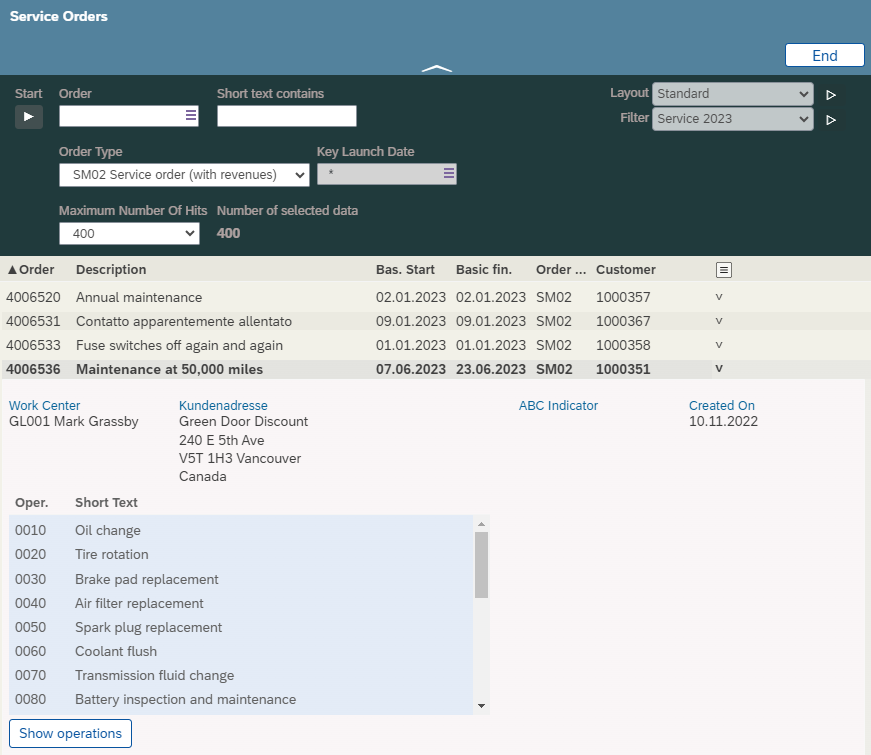
This can be done in HTML using the style specifications "max-height:200px;overflow:auto". It is best to make only the table scrollable without the column headers, so that the column headers always remain visible:
HTML<div class="infoblock"
style="height: auto; width: auto"
data-s10title="Items table"
name="tabafvc">
<!-- column headers -->
<div class="colheaders"
style="background-color: transparent;">
<div class='colhead'
style="width: 60px;">
Item
</div>
<div class='colhead'
style="width: 400px;">
Short text
</div>
</div>
<!-- list rows -->
<form class='table'
name='myviaufk.tabafvc'
style="max-height: 200px;
overflow: auto;
background-color: #2196f31a;">
<div class="tablerow">
<div class='outputcelldiv'
style="width: 60px;"
name="vornr">
</div>
<div class='outputcelldiv'
style="width: 400px;"
name="ltxa1">
</div>
</div>
</form>
</div>The detailed display of the tasks appears when you click on the "Show tasks" button, which is already implemented as a separate screen in Tutorial 11. We add the following information to the list:
- Date of the last confirmation
- Status Open/Partially Confirmed/Finally Confirmed with a matching icon

Neither information can be accessed directly via SAP interfaces, so we need our own program logic in which we read the SAP tables directly.
As a technique we use the "build methods" as described in tutorial 2 "Derived values". Our process table "tabafvc" from tutorial 11 consists of objects of the class "afvc_short":
ABAPdata:
tabafvc type table of ref to afvc_short.The two additional fields therefore go into the class "afvc_short", so that the information can be displayed per list line:
ABAP
class afvc_short definition inheriting from /s10/any.

  public section.

  ....

      data:
       afrudate type d,     " Last confirmation
       Status   type string." Status
For "afrudate" and "status" we now implement a build method for calculating the value in each case. As importing parameter we use the technical confirmation number "afvc-rueck", which uniquely identifies the operation:
ABAP
methods:
      build_afrudate
        importing
          rueck    type afvc-rueck
        exporting
          afrudate type d,

      build_status
        importing
          rueck  type afvc-rueck
        exporting
          status type string.
As a rule, "importing" should specify exactly the attributes of the object on which the attribute or attributes to be calculated depend. However, if the calculation of the attributes requires other objects or database tables, this is not possible. It makes sense to then specify at least matching key fields so that when another database object is read in, the values are recalculated. After update operations, for example adding or cancelling a confirmation, one must trigger the recalculation of such attributes oneself by s10rebuild() or create the whole object again. This point will be elaborated further below.
The date of the last confirmation "afrudate" is determined from the database table "afru". It should be noted that we are not allowed to consider cancelled confirmations as well as the cancellation confirmations. Technically, these are the conditions stokz = "" as well as "stzhl = "". It would be nicer if SAP would provide an interface (BAPI for example) that provides the last confirmation date; however, this does not seem to be the case. As an alternative to the direct reading of the database table "afru" via a "select" statement used here, we can also read the confirmations via a call to "BAPI_ALM_CONF_GETLIST", although this would make the coding more complicated and somewhat slower.
ABAP
method build_afrudate.

    clear afrudate.
    select single max( isdd ) from afru into afrudate
     where rueck = rueck and stokz = '' and stzhl = ''.

  endmethod.
To determine the status, we also read the confirmations for the operation and check whether at least one confirmation is a "final confirmation":
ABAP
method build_status.

* Reset status
    clear status.

    data: aueru type afru-aueru. "X" = final confirmation

* Read confirmation
    select aueru from afru into aueru
      where rueck = rueck and stokz = '' and stzhl = ''.

* at least one final confirmation ?
      if aueru = 'X'.
        status = 'Finally confirmed'.
        return.
      endif.

    endselect.

* at least one confirmation ?
    if sy-subrc = 0.
      status = 'Partially confirmed'.
      return.
    endif.

* no confirmation
    status = 'Open'.

endmethod.
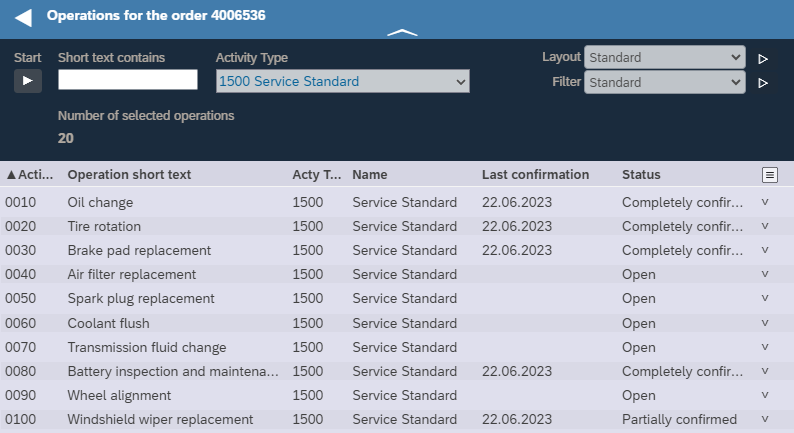
This will output the corresponding text in the table:
In order to output the corresponding icon before the status text, we define three CSS classes in the HTML file:
HTML
<style>

    .itemcomplete {
        padding-left: 18px;
        background-image: url(../../icons/itemcomplete.png);
        background-size: 16px;
        background-repeat: no-repeat;
    }

    .iteminwork {
        padding-left: 18px;
        background-image: url(../../icons/iteminwork.png);
        background-size: 16px;
        background-repeat: no-repeat;
    }

    .itemopen {
        padding-left: 18px;
        background-image: url(../../icons/itemopen.png);
        background-size: 16px;
        background-repeat: no-repeat;
    }

</style>
Technically, we work here with a background image and move the status text 18 pixels to the right so that the icon appears on the left as a background image. In our ABAP build method we now assign the correct class by "s10addcss":
ABAP
method build_status.

* Reset status
    clear status.
    s10removecss( attrname = 'status' ).

    data: aueru type afru-aueru. "X" = final confirmation

* Read confirmation
    select aueru from afru into aueru
      where rueck = rueck and stokz = '' And stzhl = ''.

* at least one final confirmation ?
      if aueru = 'X'.
        status = 'Finally Confirmed'.
        s10addcss( attrname = 'status' cssclassname = 'itemcomplete' ).
        return.
      endif.

    endselect.

* at least one confirmation ?
    if sy-subrc = 0.
      status = 'Partially Confirmed'.
      s10addcss( attrname = 'status' cssclassname = 'iteminwork' ).
      return.
    endif.

* no confirmation
    status = 'Open'.
    s10addcss( attrname = 'status' cssclassname = 'itemopen' ).

endmethod.
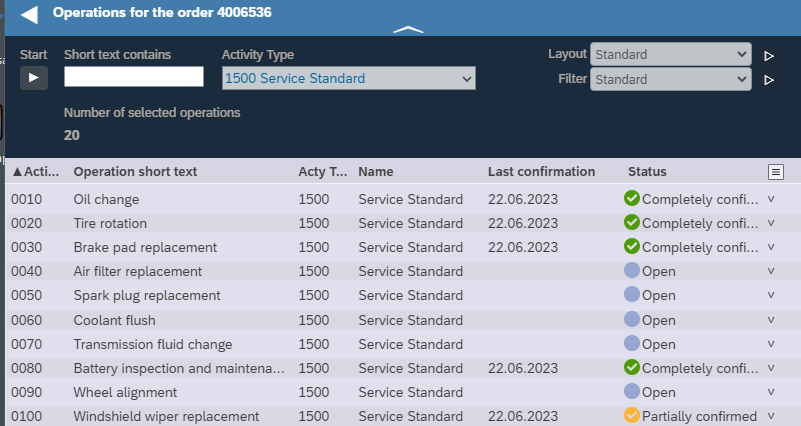
Now the corresponding icon appears as a background image:
By clicking on one of the operations, we show the confirmation of the operation. Here using operation 0120, "Fuel filter replacement", as an example:
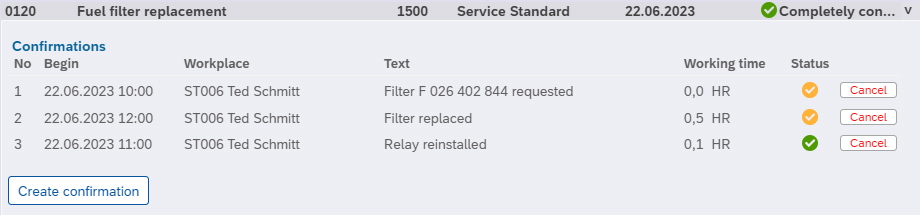
Again, there are some special features that we can implement using "derived values":
- Start of work including the time, but without seconds
- Workplace with text
- Status of the confirmation as an icon, so that one recognizes the final confirmation
First of all, to the table of confirmations. To do this, we generate an S10 class "afru_db" with the required fields using the S10 utilities:
ABAP
class afru_db definition inheriting from /s10/any.

  public section.

* table fields for detail view, plus key fields

    data:
      rueck type afru-rueck,
      rmzhl type afru-rmzhl,
      ltxa1 type afru-ltxa1,
      arbid type afru-arbid,
      isdd  type afru-isdd,
      isdz  type afru-isdz,
      iedd  type afru-iedd,
      iedz  type afru-iedz,
      ismnw type afru-ismnw,
      ismne type afru-ismnu,
      aueru type afru-aueru,
      werks type afru-werks.
In the class "afvc_detail" of the operation details we include a table "tabafru" of the confirmations about the operation:
ABAP
data: tabafru type table of ref to afru_db.To fill the confirmation table a build method:
ABAP
methods:
      build_afrutab
        importing
          rueck   type afvc-rueck " confirmation number
        exporting
tabafru type table.ABAP
class afvc_detail implementation.

  method build_afrutab.
    s10databaseselect(
     exporting
       condition = |rueck = @rueck and stokz = '' and stzhl = ''|
   changing
      folder = tabafru ).

  endmethod.
This will build the table of confirmations when the operation details are displayed, once we have defined it in HTML and it is active in the layout definition of the table details.
We now complete our three fields
- Start of work
- Workplace with text
- Status of the confirmation as icon
To do this, note that these fields belong in the "afru_db" class, since they belong to the confirmation.
ABAPdata:
isstart type string,
arbpllong type string,
htmlstatus type string.For each field we define a build method in which we name the fields we use to calculate the value:
ABAP
methods:
      build_isstart
        importing
          isdd    type afru-isdd
          isdz    type afru-isdz
        exporting
          isstart type string,

      build_arbpllong
        importing
          arbid     type afru-arbid
          werks     type afru-werks
        exporting
          arbpllong type string,

      build_htmlstatus
        importing
          aueru      type afru-aueru
        exporting
          htmlstatus type string.
We compose the field "isstart" (actual start) from date and time (without seconds):
ABAPmethod build_isstart.
isstart = s10getuservalue( 'isdd' ) && | | && isdz(2) && |:| && isdz+2(2).
endmethod.Things get a little more complicated with the work center. Here SAP stores only a technical work center ID "arbid" in the table "afru", from which we determine the work center with name and text via the SAP help view "m_cramn":
ABAPmethod build_arbpllong.
data:
arbidarbpl type string,
arbidktext type string.
select single arbpl ktext into (arbidarbpl,arbidktext)
from m_cramn
where spras = sy-langu and werks = werks and objid = arbid.
arbpllong = arbidarbpl && | | && arbidktext.
endmethod.We could implement the output of the status icon for confirmation (partial confirmation or final confirmation) by a CSS class as for the status column of the operations. But to show another possibility, we use an HTML string with an HTML image output via the <img> tag:
ABAP
method build_htmlstatus.

  if aueru is initial.
    htmlstatus =
      |<img src="../../../icons/iteminwork.png"
      style="height:16px;" />|.
  else.
    htmlstatus =
      |<img src="../../../icons/itemcomplete.png"
      style="height:16px;" />|.
  endif.

endmethod.HTML
<div class='outputcelldiv '
      style="width: 60px; text-align: center"
      name="htmlstatus">
</div>

We still have to tell the S10 Framework that the "htmlstatus" column is to be interpreted as HTML code, which is done via the CSS class "outputcellhtmldiv":
HTML<div class='outputcellhtmldiv '
style="width: 60px; text-align: center"
name="htmlstatus">
</div>With this, the img tag is now interpreted as image output and our icon appears:

Of the two techniques (CSS in the HTML page or generation of HTML code in ABAP), the CSS approach better corresponds to the separation of layout (HTML) and application logic (ABAP). However, there are some cases that cannot be implemented with CSS, for example a dynamic tooltip (title attribute in HTML) or a dynamically set link. In these cases, HTML generation offers all the possibilities of HTML.
Now we are missing the implementation of the actions "Cancel" and "Create confirmation". In HTML, these are pushbuttons, for "Cancel" on the right in each confirmation row and for "Create confirmation" after the confirmation table.
We now start with "Create confirmation". First, in HTML, the definition of the pushbutton:
HTML<div class="infoblock"
style="padding: 4px;"
data-s10title="Create confirmation"
name="create_confirmation">
<button type="button" class="button"
onclick="S10Apply('create_confirmation');">
Create confirmation
</button>
</div>By creating the pushbutton as an "infoblock", it appears in the layout definition and can thus be shown and hidden separately:
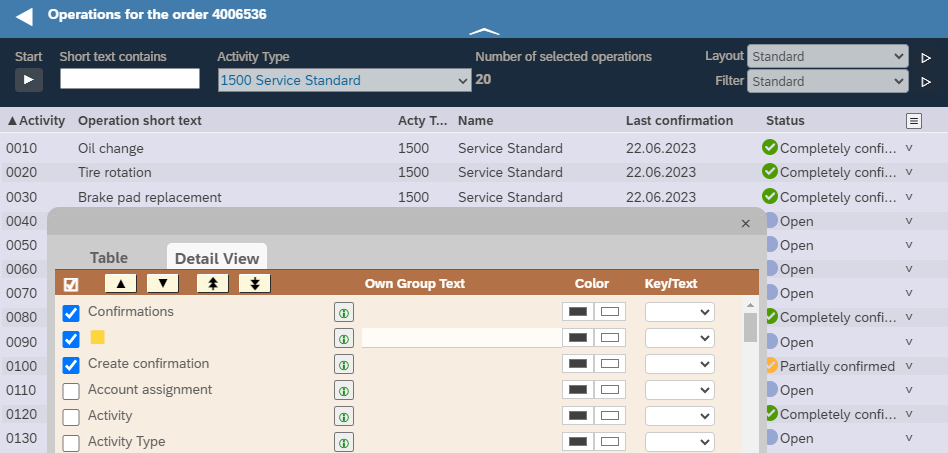
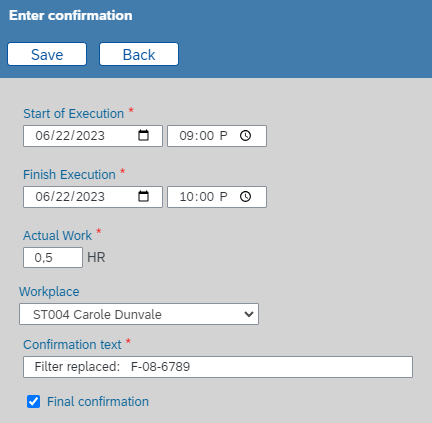
The pushbutton calls the method "create_confirmation", in the class "afvc_manager" to which the HTML page belongs. It displays an entry screen for the confirmation:
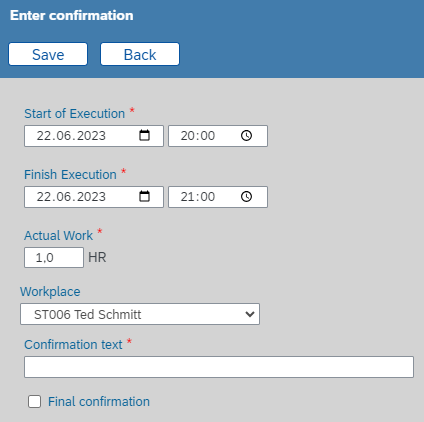
We created the HTML page for this in the confirmation class "afru_db"; the file path in our project is "classes/afru_db/views.en/afru_db.create.html" . You can use the S10 generation /s10/util to generate a first version of the data entry mask from the table "afru".
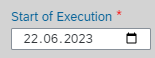
We will first discuss the input fields of the entry mask. The date field "isdd":
<label class="label output" for="isdd"
    name="isdd"></label>
<br>
<input type="date" max="9999-12-31"
    class="input" required
    id="isdd"
    name="isdd"
    style="width: 140px;">
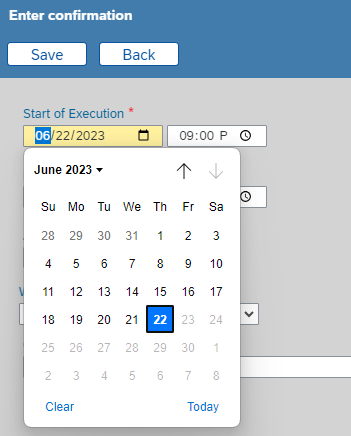
The parameter max="9999-12-31" is generated by the S10 utilities to prevent an erroneously entered 5-digit year. For confirmations, it may additionally be useful to prevent dates that lie in the future. You can achieve this in HTML with some JavaScript, in which the "max" option of the <input> tag is dynamically set to the current date:
HTML
<input type="date" class="input"
    required id="isdd" name="isdd" style="width: 140px;">
<script>
      var today = new Date().toISOString().substring(0, 10);
      document.getElementById("isdd").max = today;
</script>
The browsers then do not offer date input from the future:
Correspondingly for direct date input:
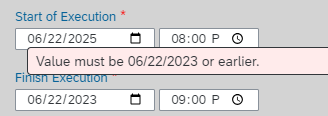
Checks of this kind directly in the HTML page are helpful for the user, but unfortunately we cannot rely on them, as it is possible to change the max= specification in the debugging mode of the browser:
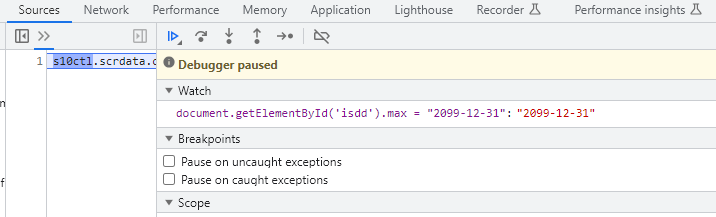
Therefore, if a check is important for the correctness of the application, you must perform it additionally in your ABAP program. In most cases, the SAP interfaces (BAPI call or Call Transaction) perform all checks. In this case, the SAP system tolerates confirmations with future dates, but performs the check "start date before end date", for example.
As described in tutorial 4, we can perform the check using a "validate" method as follows:
ABAP
methods:
      validate_isdd
        importing
          isdd type afru-isdd.


....

  method validate_isdd.

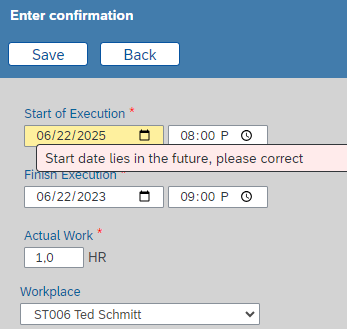
    if isdd > sy-datum.
      s10errormessage( |Start date lies in the future, please correct| ).
    endif.

  endmethod.
With incorrect input, the focus is then automatically set to the incorrect input field:
For the time input we use the type "time" in HTML:
HTML<input type="time" class="input" required
id="isdz" name="isdz"
style="width: 100px;">
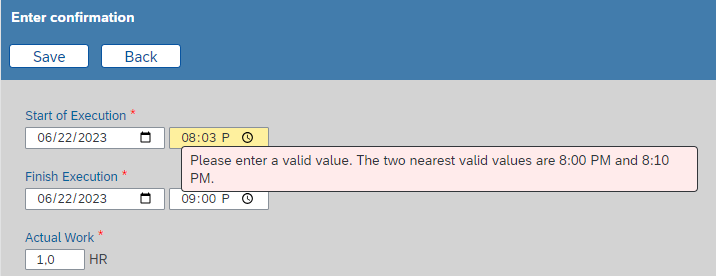
Again, note that an additional check in ABAP is required if you want to ensure that no other times are entered via browser debugging as well.
The work center is entered via a dropdown list:
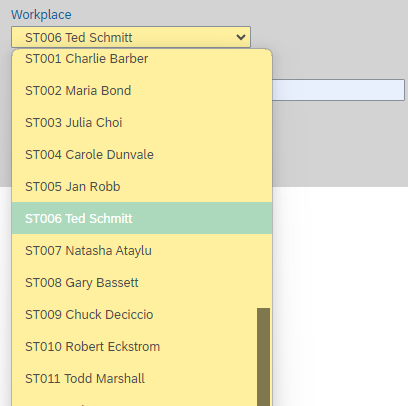
Since there is no directly usable standard drop-down list for the data element "arbpl", we use here the technique described in the documentation of s10dropdownlist() to override the s10dropdownlist() method of the S10 Framework. HTML code:
HTML<label class="label" for="arbpl">Arbeitsplatz</label>
<br>
<select class='inputselect' size="1" name="arbpl"
data-s10dropdownlist="arbpl@dropdownlist"
data-s10options="noEmptyEntry"
id="arbpl" style='width: 240px;'>
</select>ABAP
methods:
      s10dropdownlist  redefinition.

    ...

method s10dropdownlist.
    case attrname.

      when 'ARBPL'.

        data:
          arbidarbpl type string,
          arbidktext type string.

        select distinct arbpl ktext into (arbidarbpl,arbidktext)
               from  m_cramn
               where werks = werks and spras = sy-langu
          order by arbpl.


          ddlstring = ddlstring
                   && arbidarbpl && cl_abap_char_utilities=>horizontal_tab
                   && arbidktext && cl_abap_char_utilities=>cr_lf.

        endselect.
        return.


    endcase.

* default
    ddlstring = super->s10dropdownlist(
           attrname = attrname
           valuelist = valuelist
           condition = condition ).

endmethod.ABAP
method create_confirmation.

* read current table row.
    data: tabindex type i.
    tabindex = s10contextinfo( )->rownumber.
read table tabafvc index tabindex assigning field-symbol(<row>).ABAP
method Create_confirmation.

* read current table row.
    data: tabindex type I.
    tabindex = s10contextinfo( )->rownumber.
    read table tabafvc index tabindex assigning field-symbol(<row>).

* read table row data
    <row>->s10databaseread(  ).

    data: myafru type ref to afru_db.
    create object myafru.

* set some defaults
    myafru->rueck = <row>->rueck.
    myafru->isdd = sy-datum.
    myafru->isdz(2) = sy-uzeit(2) - 2.   myafru->isdz 2(4) = '0000'.
    myafru->iedd = sy-datum.
    myafru->iedz(2) = sy-uzeit(2) - 1.   myafru->iedz 2(4) = '0000'.
    myafru->ismnw = '1'.
    myafru->ismne = 'STD'.

    myafru->werks = <row>->werks.
    myafru->arbpl = 'ST006'.  "demo value, user parameter in real applications


    data: rc type String.
    rc = myafru->s10dialog( 'create' ).
...In the confirmation dialog, the user can save the entered data using the "Save" button:
HTML<button type="button" class="toolbarbutton" Onclick="S10Apply('save');">
Save
</button>The pushbutton calls the "save" method of the current object "myafru", in which we save the confirmation via SAP interfaces. We use a "Call Transaction" on transaction IW41, as described in Tutorial 3:
ABAPmethod save.
* bdc data
data:
bdcdatawa type bdcdata,
bdcdata type table of bdcdata.
* message table for call transaction
data:
messtabwa type bdcmsgcoll,
messtab type table of bdcmsgcoll.
* create bdc data
* screen 3000
clear bdcdatawa.
bdcdatawa-program = 'SAPLCORU'.
bdcdatawa-dynpro = '3000'.
bdcdatawa-dynbegin = 'X'.
append bdcdatawa to bdcdata.
clear bdcdatawa.
bdcdatawa-fnam = 'CORUF-RUECK'.
bdcdatawa-fval = s10getuservalue( 'rueck' ).
append bdcdatawa to bdcdata.
clear bdcdatawa.
bdcdatawa-fnam = 'BDC_OKCODE'.
bdcdatawa-fval = '=ENTR'.
append bdcdatawa to bdcdata.
* screen 3200
clear bdcdatawa.
bdcdatawa-program = 'SAPLCORU'.
bdcdatawa-dynpro = '3200'.
bdcdatawa-dynbegin = 'X'.
append bdcdatawa to bdcdata.
clear bdcdatawa.
bdcdatawa-fnam = 'AFRUD-ISDD'.
bdcdatawa-fval = s10getuservalue( 'isdd' ).
append bdcdatawa to bdcdata.
clear bdcdatawa.
bdcdatawa-fnam = 'AFRUD-ISDZ'.
bdcdatawa-fval = s10getuservalue( 'isdz' ).
append bdcdatawa to bdcdata.
clear bdcdatawa.
bdcdatawa-fnam = 'AFRUD-IEDD'.
bdcdatawa-fval = s10getuservalue( 'iedd' ).
append bdcdatawa to bdcdata.
clear bdcdatawa.
bdcdatawa-fnam = 'AFRUD-IEDZ'.
bdcdatawa-fval = s10getuservalue( 'iedz' ).
append bdcdatawa to bdcdata.
clear bdcdatawa.
bdcdatawa-fnam = 'AFRUD-LTXA1'.
bdcdatawa-fval = s10getuservalue( 'ltxa1' ).
append bdcdatawa to bdcdata.
clear bdcdatawa.
bdcdatawa-fnam = 'AFRUD-ISMNW_2'.
bdcdatawa-fval = s10getuservalue( 'ismnw' ).
append bdcdatawa to bdcdata.
clear bdcdatawa.
bdcdatawa-fnam = 'AFRUD-ISMNU'.
bdcdatawa-fval = s10getuservalue( 'ismne' ).
append bdcdatawa to bdcdata.
clear bdcdatawa.
bdcdatawa-fnam = 'AFRUD-ARBPL'.
bdcdatawa-fval = arbpl.
append bdcdatawa to bdcdata.
if aueru ne '1'.
bdcdatawa-fnam = 'AFRUD-AUERU'.
bdcdatawa-fval = ''.
append bdcdatawa to bdcdata.
bdcdatawa-fnam = 'AFRUD-LEKNW'.
bdcdatawa-fval = ''.
append bdcdatawa to bdcdata.
else.
bdcdatawa-fnam = 'AFRUD-AUERU'.
bdcdatawa-fval = 'X'.
append bdcdatawa to bdcdata.
bdcdatawa-fnam = 'AFRUD-LEKNW'.
bdcdatawa-fval = 'X'.
append bdcdatawa to bdcdata.
endif.
clear bdcdatawa.
bdcdatawa-fnam = 'BDC_OKCODE'.
bdcdatawa-fval = '=BU'.
append bdcdatawa to bdcdata.
call transaction 'IW41' with authority-check
using bdcdata
mode 'N'
update 'S'
messages into messtab.
data: messagetext type string.
loop at messtab into messtabwa.
case messtabwa-msgtyp.
when 'E' or 'A'.
message
id messtabwa-msgid
type messtabwa-msgtyp
number messtabwa-msgnr
with messtabwa-msgv1
messtabwa-msgv2
messtabwa-msgv3
messtabwa-msgv4
into messagetext.
s10errormessage( messagetext ).
when 'W'.
" warnings ignored
when others.
s10exitdialog( 'X' ).
endcase.
endloop.
endmethod.
The dialogue is ended by s10exitdialog( 'X' ) with the return value 'X' and the processing is continued in our method "create_confirmation" after calling s10dialog( ).
If we now do nothing further in "create_confirmation", the confirmation is saved, but the list still shows the old status, i.e. the new confirmation is missing in the table of confirmations and also a possible status change of the operation, for example in the case of a final confirmation, as well as the date of the last confirmation are not correctly displayed:
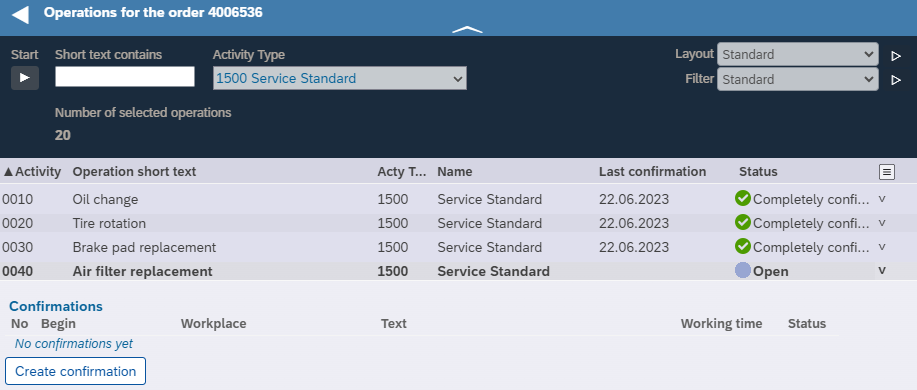
Here, on return, the operation status should immediately be "Finally confirmed" and the new confirmation should be inserted in the table of confirmations:
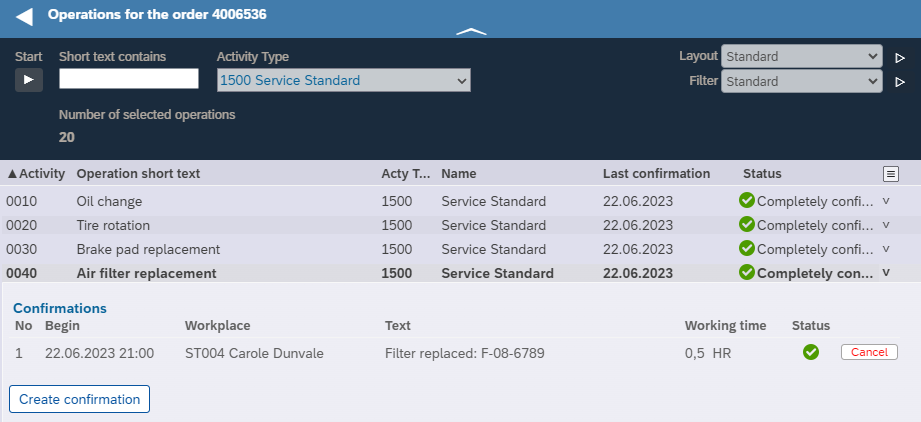
In the S10 Framework the technique for this is provided and, in the article Update for tables, described. In our case, the coding for this looks as follows, here with the entire method "create_confirmation":
ABAP
method create_confirmation.

* read current table row.
    data: tabindex type i.

    tabindex = s10contextinfo( )->rownumber.

    read table tabafvc
      index tabindex
      assigning field-symbol(<row>).

* read table row data
    <row>->s10databaseread( ).

    data: myafru type ref to afru_db.

    create object myafru.

* set some defaults
    myafru->rueck = <row>->rueck.
    myafru->isdd  = sy-datum.

    myafru->isdz(2) = sy-uzeit(2) - 2.
    myafru->isdz 2(4) = '0000'.

    myafru->iedd  = sy-datum.

    myafru->iedz(2) = sy-uzeit(2) - 1.
    myafru->iedz 2(4) = '0000'.

    myafru->ismnw = '1'.
    myafru->ismne = 'STD'.

    myafru->werks = <row>->werks.
    myafru->arbpl = 'ST006'.  "demo value, user parameter in real
                               "applications

    data: rc type string.

    rc = myafru->s10dialog( 'create' ).

* no save ?
    if rc ne 'X'.
      return.
    endif.

* refresh item detail data
    create object myafvc.

    myafvc->aufpl = <row>->aufpl.
    myafvc->aplzl = <row>->aplzl.

    myafvc->s10databaseread( ).

* read table row data and invalidate build fields
    <row>->s10databaseread( ).
    <row>->s10rebuild( ).

* force transport of current detail area
    <row>->s10detailview = 'X'.

endmethod.
Explanations
We first query by "if rc='X' " whether the user has saved the confirmation, because otherwise we do not need to change anything in the list. Subsequently, the object "myafvc", which is used in HTML to display the operation details, is recreated, the key values are set and the values are read from the database. Since it is a new object, the build method for determining the confirmation will spawn again and display the freshly captured confirmation.
For the status change in the operation line, i.e. "finally confirmed" in our example, we also re-read the operation data of the table line (class afvc_short) from the database. In addition, s10rebuild() invalidates all previously determined build fields, so that the status is determined anew. This is necessary here, because the status cannot be determined directly from fields in the table "afvc", but is determined from the confirmations in the database table "afru".
As an alternative to s10rebuild(), we can recreate the task object in the task table with "create object <row>":
ABAP* refresh item detail data
create object myafvc.
myafvc->aufpl = <row>->aufpl.
myafvc->aplzl = <row>->aplzl.
myafvc->s10databaseread( ).
* refresh table row data
create object <row>.
<row>->uppl = myafvc->uppl.
<row>->aplzl = myafvc->aplzl.
<row>->s10databaseread( ).
* force transport of current detail area
<row>->s10detailview = 'X'.Cancel confirmation
We implement the "Cancel" function similarly, but here there is a small additional difficulty: The Cancel button is in each row of the confirmation table, and we get the row number in the confirmation table with s10contextinfo()->rownumber, but not the one in the parent operation table. The problem thus arises from the nested table display, i.e. the table of confirmations per operation is displayed within the table of operations, and via s10contextinfo()->rownumber only the line number of the current table (confirmations) can be determined.
Therefore, instead of "s10contextinfo()->rownumber", we use another function of s10contextinfo(), namely the return of field contents that are contained in the HTML page and have the CSS class "linkkey". The mechanism is as follows:
- A call to S10Apply() first determines the "anchor element" of the action. This is usually the pushbutton from which the action originates. You can also specify the anchor element explicitly as a parameter in S10Apply().
- If the anchor element is in the expanded area of a table row, all linkkey content defined at the beginning of the detail area is provided with s10contextinfo()
- If the anchor element is in a table row, all linkkey columns are provided with s10contextinfo()
- If the anchor element is not in a table row, all "sibling nodes" that are on the same level as the anchor element and have CSS class "linkkey" are provided
In concrete terms, this looks like this in our case: In the HTML page, we include the key fields "aufpl" and "aplzl" of the operation in the detail area of the expanded operation right at the beginning:
HTML<button type="button"
class="button"
onclick="S10Apply('cancel_afru');"
style="height: 16px;
border-color: #a7a6a6;
color: red;
font-size: 9pt;"
title="Rückmeldung stornieren">
Stornieren
</button>HTML
<form class='table'
    name='myafvc.tabafru'>

    <div class="tablerow">

        <!-- hidden keys -->
        <span class="outputcell linkkey"
            name="rueck">
        </span>

        <span class="outputcell linkkey"
            name="rmzhl">
        </span>

        ...
    </div>

</form>HTML definition of the Cancel button:
<button type="button"
    class="button"
    onclick="S10Apply('cancel_afru');"
    style="height: 16px;
    border-color: #a7a6a6;
    color: red;
    font-size: 9pt;"
    title="Cancel confirmation">
    Cancel
</button>
ABAP method "cancel_afru":
ABAP
method cancel_afru.

* hidden key fields from HTML page
    data:
      aufpl type afvc-aufpl,
      aplzl type afvc-aplzl,
      rueck type afru-rueck,
      rmzhl type afru-rmzhl.

    s10fromcontextinfo(
      exporting key = 'aufpl'
      changing result = aufpl ).

    s10fromcontextinfo(
      exporting key = 'aplzl'
      changing result = aplzl ).

    s10fromcontextinfo(
      exporting key = 'rueck'
      changing result = rueck ).

    s10fromcontextinfo(
      exporting key = 'rmzhl'
      changing result = rmzhl ).

* read current table row.
    read table tabafvc
      with key
        table_line->aufpl = aufpl
        table_line->aplzl = aplzl
      assigning field-symbol(<row>).

* user warning
    if s10confirmation(
      |Do you really want to remove the confirmation |
      && rmzhl && | ?| ) ne 'X'.
      return.
    endif.

* cancel confirmation via BAPI
    data: bapiret2 type bapiret2.

    call function 'BAPI_ALM_CONF_CANCEL'
      exporting
        confirmation        = rueck
        confirmationcounter = rmzhl
      importing
        return              = bapiret2.

* any error?
    if bapiret2-type eq 'E' or bapiret2-type eq 'A'.
      call function 'BAPI_TRANSACTION_ROLLBACK'.
      s10errormessage( conv string( bapiret2-message ) ).
      return.
    endif.

* commit with wait
    call function 'BAPI_TRANSACTION_COMMIT'
      exporting
        wait = 'X'.

* read table row data again and invalidate build fields
    <row>->s10databaseread( ).
    <row>->s10rebuild( ).

* force transport of detail area
    <row>->s10detailview = 'X'.

* set key fields
    create object myafvc.
    myafvc->aufpl = aufpl.
    myafvc->aplzl = aplzl.

* read detail data again
    myafvc->s10databaseread( ).

endmethod.
Explanations
- First we retrieve all key fields using s10contextinfo().
- We then show the user a warning asking if they really want to delete the confirmation
- If the answer is "Yes", we make the BAPI call to delete the response
- If an error occurs during the deletion, we perform a rollback and return the error message provided by the BAPI
- Otherwise, we commit and wait for the database to be updated so that we can read the new values afterwards
- After that we read the current operation again and invalidate the build fields, just as we did after adding a response
- We also rebuild the expanded operation details with the confirmation table, just like after adding a confirmation
The last two steps ensure that the current state is visible immediately after a confirmation is cancelled:
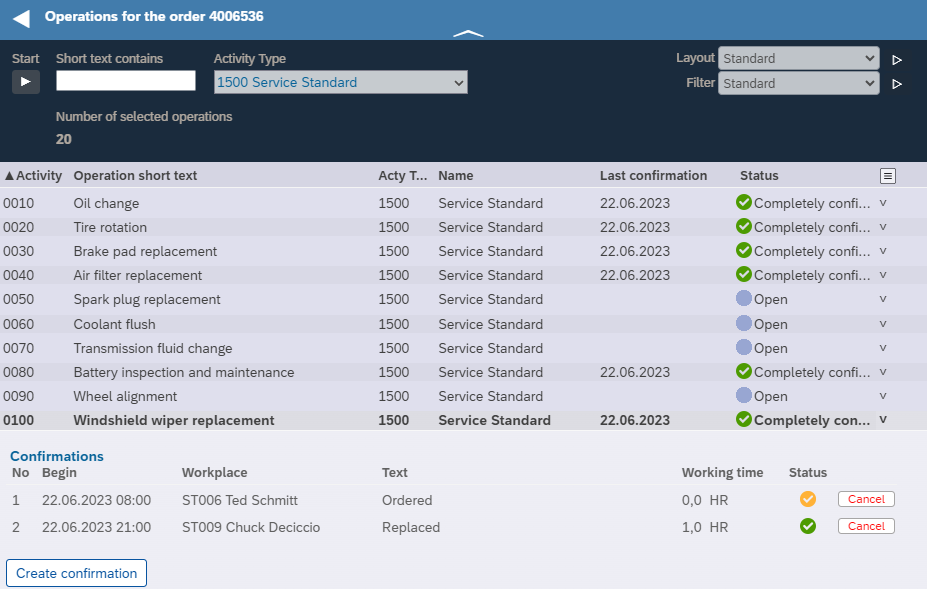
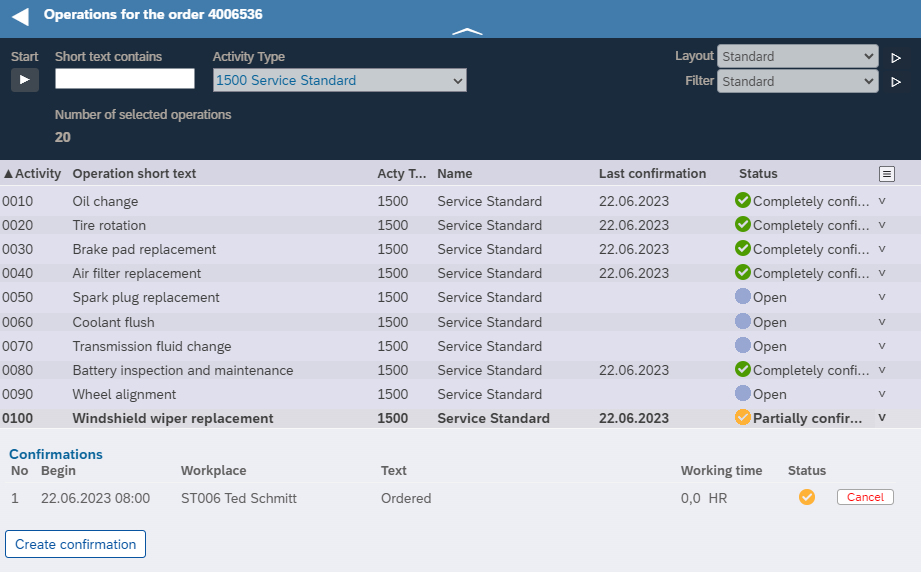
We press "Cancel" on the second confirmation and get the following display where the confirmation is deleted and the operation status is changed to "Partially confirmed":
The S10 Framework, which consistently relies on object orientation and works with ABAP OO, initially requires some mental work to understand the interaction of the HTML pages in the browser with the ABAP objects on the server. However, it provides the right framework for modular development of complex applications that run fast and offer an optimal user experience.